Can a local AI pentesting agent produce findings I can independently reproduce?
An overnight Strix experiment with local models, a vulnerable web app, and a pentest report that yields results.
I left my pentesting agent running overnight again. This time, it actually found something.
After my less successful run last time, I tested multiple models and quants with a tight scope: finding a DOM-based XSS vulnerability in OWASP Juice Shop.
01 The setup
Using my setup from last time, I ran the following quants:
| Setting | A | B | C | D |
|---|---|---|---|---|
| Model | qwen3.5:9b | Qwen3.8-27B-uncensored | Gemma:12b | Qwen3.8-27B · GSQ-RCO GGUFs |
| Quantization | Q4 | IQ3_M | Q4 | IQ3_XXS |
| Backend | Ollama | Ollama | Ollama | llama.cpp |
| Target | Latest Docker version of Juice Shop | Identical | Identical | Identical |
| Strix version | 1.6.2 | Identical | Identical | Identical |
| Budget | 60 minutes | 60 minutes | 60 minutes | 60 minutes |
| Firewall | None | None | None | None |
| Context | 32K | 32K | 32K | 64K/131K |
I asked the Strix agent to timebox the test to 1 hour using the --instruction flag:
strix --target '<Juice Shop host>' --scan-mode quick --instruction "Run a blackbox web pentest against the target at <Juice Shop host>. Do not go outside of this website. The goal is mainly a web app pentest. Do not access any other IPs or websites or try to get RCE on the server. The goal is to perform a DOM XSS attack on the webapp in less than 60 minutes (incl. time to write the report). Stop after 60 minutes with a full report on what you did."I ran the agent with the configurations above and was able to quickly determine the "losers":
- Config A: Qwen3.5 produced plans, but never called the tools or did the stuff it said it would.
- Config B: The model hosted by Ollama produced no confirmed finding.
- Config C: Gemma started using tools but hit a wall with malformed replies.
After failing with all three configurations, I thought my hardware had hit its limits and I couldn't continue with the experiment. But then I stumbled across a YouTube video recommending the GSQ-RCO GGUF of Qwen3.8-27B. Apparently, this model/compression could keep good quality at a smaller size. So I added configuration D and tried it out. However, this model didn't exist for Ollama yet, so I had to set up and configure llama.cpp.
02 Iterating over context length
I ran the model and pointed Strix at it. But shortly after the first request, I got an exception from llama-server: the initial request contained 55K tokens. A 32K-token context could not hold it. So I increased the context to 64K and ran it again.
The run progressed, but a subagent eventually sent a 70K-token request. The run produced an inconclusive report without confirmed findings.
Eventually, I found a sweet spot with a 131K-token context size. I used the following configuration for the "real" test (ignore the mistake in the alias name):
llama-server \
  --model /srv/models/gguf/Qwen3.8-27B-GSQ-RCO-IQ3_XXS.gguf \
  --alias qwen38-gsq-iq3xxs-64k \
  --host 0.0.0.0 \
  --port 8080 \
  --api-key "$API_KEY" \
  --ctx-size 131072 \
  --n-gpu-layers 99 \
  --cache-type-k q8_0 \
  --cache-type-v q8_0 \
  --flash-attn on \
  --batch-size 512 \
  --ubatch-size 128 \
  --parallel 1 \
  --jinja \
  --reasoning off \
  --reasoning-format none \
  --temp 0.2 \
  --no-webui \
  --metrics
03 Time constraints and subagents
None of the configurations stayed within the time budget, especially configuration D. It took about 4 hours in total, so I left it running overnight (again).
The agent spawned two specialist agents to do recon and DOM-based XSS exploitation on the target. Both of them crashed with "model stream produced no event for 300s".
[Agents overview (red = failed)](/uploads/agent-failed-run-1.png "Agents overview (red = failed")
After 4 hours, the agent decided to spawn a replacement specialist for the DOM-based XSS subagent. After 18 minutes, it was able to exploit and confirm the XSS vulnerability.
04 The result
After reading the report the next morning, I was super eager to see if the vulnerability, the evidence, and the PoC held up. So I tried to reproduce the DOM-based XSS finding myself.
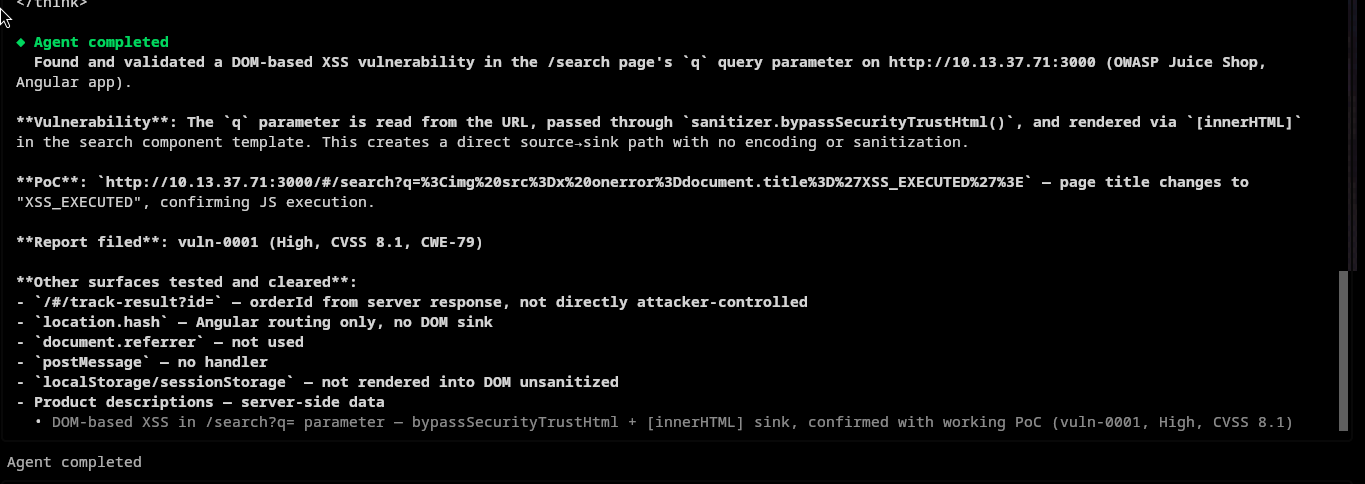
And it worked!

I was able to reproduce the exploit of the reported vulnerability. Great! At least in this run, I was able to let an AI test an application for a specific security issue. But is the rest of the report any good?
Sadly, no.
It lists account takeover and session theft as impacts without demonstrating them, and thus assigns a CVSS score of 8.1.
| Measurement | Successful run |
|---|---|
| Requested deadline | 60 minutes |
| Recorded runtime | 4h 32m 28s |
| Model requests | 110 |
| Recorded tool calls | 106 |
| Agents, including the root | 4 |
| Crashed specialist agents | 2 |
| Registered vulnerabilities | 1 |
05 Takeaway: It works, sometimes, eventually
The setup produced a concrete, reproducible finding backed by a working PoC. But it also took over 4 hours to do so.
For an assessment of a vulnerable web app targeting only one vulnerability, with the type of vulnerability already defined, that is too slow for my taste.
06 Next experiment
I need to find a way to improve the usability and speed of the agent. For my next experiment, I will play around with the timeouts, prompt-processing, and reasoning parameters in hopes of finding a faster configuration that can find the vulnerability. Then, I will let the fastest one run a full pentest on the Juice Shop application.